Table of Contents
Townie Requests in Melino


Section 1: Overview — What Are Townie Requests?
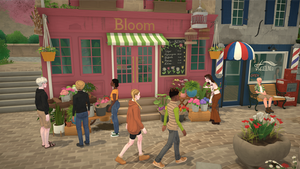
Townie Requests are dynamic side-missions issued by NPC residents (townies) throughout the city of Melino. When you walk past certain NPCs or visit key locations, they may approach you with a task they need help completing. Completing these requests rewards you with Paradimes, relationship boosts, reputation points, and sometimes unique items.
The system received major quality-of-life improvements in Patch 0.1.3, fixing long-standing bugs around trash bag spawning, render distance issues, and edge cases involving deceased townies. If you tried townie requests before this patch and found them frustrating, it's time to give them another look!
Key Features of the System:
- NPC-Driven: Real townies (not generic quest-givers) ask you for help based on their personality, location, and current situation
- Diverse Task Types: Cleaning, delivery, item finding, social tasks, skill challenges, and more
- Dynamic Spawning: Requests appear organically as you explore Melino — no quest board needed
- Meaningful Rewards: Paradimes, relationship gains, reputation, and rare unique rewards
- Hall of Fame Integration: The Town Hall displays skill masters you can challenge for ultimate bragging rights
Why Townie Requests Matter
Townie requests are one of the best ways to earn early-game Paradimes without a career, build relationships with NPCs quickly, and unlock the prestigious Town Hall Wall of Fame. They transform passive walking-around time into productive gameplay. Even if you only complete 2-3 requests per play session, the cumulative rewards add up significantly over time.
Section 2: All Known Townie Request Types
As of Patch 0.1.3, the following request types have been confirmed in Melino. Each type has different difficulty levels, rewards, and trigger conditions:
| Request Type | Description | Difficulty | Typical Reward | Location Trigger |
|---|---|---|---|---|
| Clean the Beach | Pick up spawned trash bags along the shoreline | Easy | 30-80 Paradimes | Beach area, coastal townies |
| Deliver Item | Carry an object from point A to point B (or to a specific NPC) | Easy–Medium | 40-100 Paradimes | Any district, random townies |
| Find Lost Object | Search a designated area for a misplaced item | Medium | 50-120 Paradimes | Parks, plazas, residential areas |
| Social Task | Comfort, cheer up, or spend time with a lonely/sad townie | Easy | +Relationship boost | Social hotspots, cafes |
| Skill Challenge | Demonstrate a specific skill at a requested level (cooking, painting, etc.) | Medium–Hard | 80-200 Paradimes + rep | Skill-related venues |
| Gather Resources | Collect raw materials (flowers, wood, fish) for a townie | Medium | 60-150 Paradimes | Natural areas, countryside |
| Help with Event | Assist in setting up or running a town event (market day, festival prep) | Medium | 100-250 Paradimes | Event locations |
| Photography Request | Take photos of specific subjects or locations for a townie | Easy–Medium | 40-90 Paradimes | Scenic spots, landmarks |
How Requests Are Triggered
- Proximity Trigger: Walking within interaction range of a townie who has an active request available. Look for a speech bubble icon or exclamation mark above their head.
- Location Trigger: Visiting certain areas (beach, park, plaza, market) during peak hours increases spawn chances significantly.
- Relationship Trigger: Townies you're already friends with are more likely to approach you with personal requests.
- Time Trigger: Some requests only appear during specific times of day (morning errands, evening social tasks).
- Random Chance: There's always a baseline chance of encountering a requesting townie while exploring any district.
Request Difficulty Levels
- Easy (Green): Simple tasks anyone can do. Great for new players. Low risk of failure.
- Medium (Yellow): Requires some preparation (specific skills, items in inventory, knowledge of map). Moderate challenge.
- Hard (Red): Demands high skill levels, multiple steps, or tight time limits. Best saved for experienced characters.
New Player Strategy: Start with Easy requests like "Clean the Beach" and "Social Tasks" to build up your Paradime reserve and relationships before attempting Medium/Hard challenges. Each completed request also slightly increases the chance of higher-difficulty requests appearing later.
Section 3: Clean the Beach Request — Deep Dive
The "Clean the Beach" request is the most iconic and frequently encountered townie request in Paralives. It was also one of the most buggy — until Patch 0.1.3 completely overhauled it. Here's everything you need to know:
How It Works — Step by Step
- A townie near the beach area approaches you (or you approach them) and asks for help cleaning up litter.
- You accept the request through the interaction menu.
- Trash bags immediately spawn along the beach shoreline and surrounding sand area (this is the big 0.1.3 fix!).
- Walk to each glowing trash bag and interact with it to pick it up.
- Return to the requesting townie (or the designated drop-off point) once all bags are collected.
- Receive your Paradime payment and relationship boost.
Patch 0.1.3 Fixes for Clean the Beach
Before 0.1.3: Trash bags would NOT spawn until the next in-game day after accepting the request, forcing players to wait or forget about it entirely. Bags were also invisible at low render distance settings, making them nearly impossible to find.
After 0.1.3: Trash bags spawn immediately upon acceptance — no waiting! They are now always visible regardless of your render distance settings. This single fix transformed "Clean the Beach" from frustrating to genuinely enjoyable.
Trash Bag Details
| Detail | Information |
|---|---|
| Number of bags | 5-12 per request (scales with difficulty tier) |
| Spawn area | Beach shoreline, boardwalk edges, and adjacent sand zones |
| Visual indicator | Glowing outline + floating trash bag icon |
| Pickup time | ~2 seconds per bag (animation plays) |
| Total completion time | 3-8 minutes depending on bag count and travel distance |
| Time limit | None — take your time! |
Completion Rewards
- Paradimes: 30-80 (based on number of bags collected)
- Relationship boost: +10 to +25 with the requesting townie
- Reputation gain: Small increase to overall town standing ("Helpful Para" status builds up)
- Rare chance: 2% chance of finding a small collectible inside a trash bag (vintage bottle cap, interesting rock, etc.)
Section 4: How to Accept & Track Requests
Finding Requesting Townies
Townies with active requests display visual cues to help you spot them:
- Speech bubble icon floating above their head (most common indicator)
- Exclamation mark (!) for urgent/time-sensitive requests
- Question mark (?) for optional casual requests
- Glowing outline when you're within interaction range of a requesting NPC
Best places to find requesting townies:
- Old Town Plaza and surrounding streets
- Beach boardwalk and shoreline
- Park benches and picnic areas
- Outside the Town Hall building
- Café and restaurant entrances
- Bus stops and transit hubs
- Residential neighborhood sidewalks (mornings especially)
The Interaction Menu
When you click on a requesting townie, the interaction menu shows:
- Request Title: e.g., "Clean the Beach," "Deliver Package to Lucas"
- Brief Description: One-sentence summary of what's needed
- Reward Preview: Estimated Paradime payout and other rewards
- Difficulty Indicator: Easy / Medium / Hard color-coded tag
- [Accept Request] button — click to begin
- [Ask for More Details] option — get full instructions before committing
- [Decline Politely] option — refuse without relationship penalty
Active vs. Completed Requests
You can track all your current requests through the Requests Panel:
- Access: Press the default keybind (or open via the UI menu) to see active requests
- Active tab: Shows all currently accepted, incomplete requests with progress bars and timers
- Completed tab: History of finished requests, rewards earned, and which townies you've helped
- Failed tab: Lists any failed or expired requests (useful for understanding what went wrong)
Time Limits
Most townie requests have no strict time limit. However:
- Event-linked requests expire when the event ends (e.g., festival setup must be done before the festival starts)
- Perishable item deliveries have a timer (food deliveries spoil after a few hours)
- Some story-critical requests may have deadlines tied to game progression
- Standard requests (cleaning, gathering, social) can be completed at your own pace
Section 5: Request Rewards Breakdown
Understanding the reward system helps you prioritize which requests to accept. Here's the full breakdown:
Paradime Payouts Per Request Type
| Request Type | Min Payout | Max Payout | Avg. Time | Paradimes/Hour |
|---|---|---|---|---|
| Clean the Beach | 30 | 80 | 5 min | 360–960 |
| Deliver Item | 40 | 100 | 8 min | 300–750 |
| Find Lost Object | 50 | 120 | 12 min | 250–600 |
| Social Task | 0* | 20 | 10 min | 120* (rel value) |
| Skill Challenge | 80 | 200 | 15 min | 320–800 |
| Gather Resources | 60 | 150 | 15 min | 240–600 |
| Help with Event | 100 | 250 | 20 min | 300–750 |
| Photography Request | 40 | 90 | 7 min | 340–770 |
* Social Tasks primarily reward relationship points rather than direct Paradimes. Relationship value is estimated.
Relationship Boosts
Every completed request improves your standing with the requesting townie:
- Easy requests: +5 to +15 relationship points
- Medium requests: +15 to +30 relationship points
- Hard requests: +30 to +50 relationship points
- Bonus: Helping the same townie repeatedly compounds the bonus (+10% per repeat help)
Reputation & Town Standing Effects
Beyond individual relationships, completed requests contribute to your overall town reputation:
- "Helpful Neighbor" (10+ requests): NPCs greet you more warmly, slight discount at some shops
- "Community Pillar" (50+ requests): New request types unlock, some townies seek YOU out for help
- "Town Hero" (100+ requests): Maximum reputation tier — special dialogue options, exclusive events, potential key to Town Hall recognition
Rare Unique Rewards
Occasionally, requests come with special one-time rewards beyond standard payouts:
- Exclusive furniture items from grateful townies (handmade decor, heirloom objects)
- Recipe unlocks from cooking-related requests
- Skill books that grant instant skill XP in a specific category
- Unique clothing or accessories gifted by fashion-conscious townies
- Collectible items that cannot be obtained any other way
- House keys / access passes to normally locked areas (very rare)
Rare Reward Tip: The chance of receiving a unique reward scales with request difficulty AND your relationship level with the requesting townie. A Hard request from a Best Friend townie has the highest odds (~15%) of dropping something special. Always check your relationship status before accepting high-difficulty tasks!
Section 6: Town Hall Hall of Fame System
The Town Hall Hall of Fame is one of the most exciting features connected to the townie request system. Located inside the grand Town Hall building in Old Town, the Hall of Fame is a wall display showcasing Melino's most talented residents — and it's where you can prove yourself as the ultimate skill master.
What Is the Hall of Fame?
The Hall of Fame is essentially a leaderboard of skill masters. For each major skill category in Paralives (Cooking, Painting, Writing, Programming, Gardening, Fitness, Charisma, Logic, Handiness, etc.), the townie with the highest skill level has their photo displayed on the wall with their name and achievement title.
What makes it special:
- Your Para's photo gets displayed prominently if you become a skill master
- Other townies will recognize and comment on your achievement
- Unlocks special dialogue options with NPCs impressed by your credentials
- Permanent bragging right — your photo stays until someone beats your score
- Connected to the broader reputation system for synergistic benefits
How to Challenge a Skill Master
- Visit the Town Hall in Old Town (the large civic building with columns near Central Plaza)
- Enter the main hall and locate the Hall of Fame display wall
- Approach the board and examine the current skill masters listed
- Select a skill category where you believe your Para can compete
- Choose "Challenge [Name]" to initiate a skill-off against the current master
- Complete the challenge — this typically involves demonstrating your skill at a higher level than the current holder
- If successful: Your photo replaces theirs on the Wall of Fame!
Becoming a Skill Master
To beat a current skill master, your relevant skill level must exceed theirs. The system compares your current effective skill level (including any temporary buffs from mood, traits, or items) against the displayed master's level. You don't need to be max-level — just better than whoever's currently on the board. This means even mid-tier skilled Paras can claim some categories if the current master is weak in that area!
Strategy for Beating Each Skill Type
| Skill Category | Challenge Format | Preparation Tips | Difficulty to Claim |
|---|---|---|---|
| Cooking | Prepare a dish judged on quality score | Max cooking skill + best ingredients + good mood | Medium |
| Painting | Create artwork rated on technique & creativity | High painting skill + inspired mood + quality easel | Medium |
| Writing | Write a short piece evaluated on depth | Max writing + focused mood + computer access | Easy-Medium |
| Programming | Debug/code challenge with timed elements | High logic + programming skill + fast PC | Hard |
| Gardening | Grow/plant something judged on health & rarity | Max gardening + rare seeds + proper care routine | Medium |
| Fitness | Physical competition (race, lift, endurance) | High fitness + energized mood + workout equipment | Medium-Hard |
| Charisma | Social performance / speech contest | Max charisma + confident outfit + practice | Medium |
| Logic | Puzzle-solving or strategy challenge | High logic + chess practice + focused state | Medium |
| Handiness | Repair or craft something under evaluation | High handiness + tools + blueprint knowledge | Easy-Medium |
Defending Your Title
Once you're on the Wall of Fame, other townies (and even your own household members!) can challenge you. Here's how defense works:
- You receive a notification when someone challenges your title
- You have 3 in-game days to respond to the challenge
- If you win, your photo stays. If you lose, their photo replaces yours
- You can re-challenge at any time to reclaim lost titles
- Pro tip: Keep your key skills leveled up to defend multiple categories simultaneously
Section 7: Townie Death & Failed Requests
One of the more dramatic edge cases in the townie request system involves what happens when a townie dies. Patch 0.1.3 introduced explicit handling for this scenario:
If a Townie Dies Mid-Request
New in Patch 0.1.3: If a townie who issued you a request dies (from old age, accident, or any other cause), the following happens automatically:
- All active requests from that townie are marked as failed — you cannot complete them
- No penalty is applied to you — the failure doesn't count against your statistics or reputation
- Any items you collected for the request remain in your inventory — they aren't lost
- A notification appears explaining that the request was cancelled due to the townie's passing
- The request moves to your "Failed" tab with a special note indicating the cause
Understanding the Death Edge Case
This might seem dark, but it's actually important game design. Before 0.1.3, if a requesting townie died, their request would stay in your Active list forever — uncompletable, unremovable, and confusing. The patch cleaned this up properly. Now the system gracefully handles death as a natural part of Paralives' life simulation. Think of it as bittersweet storytelling: you were helping someone, and then... life happened.
Other Ways Requests Can Fail
Beyond townie death, here are all the ways a request can fail:
| Failure Cause | Penalty | Preventable? |
|---|---|---|
| Time limit expired | Small reputation hit (-2 pts) | Yes — watch timers |
| Townie died | No penalty (new in 0.1.3!) | No — unpredictable |
| You declined after accepting | -5 relationship with that townie | Yes — only accept what you can finish |
| Required item lost/destroyed | No penalty, request cancels | Yes — protect delivery items |
| Event ended before completion | No penalty, request expires | Yes — prioritize event tasks |
| Save corruption (rare) | Varies — request data lost | Keep backups |
How to Handle Failed Requests Gracefully
- Don't stress about death-related failures. Zero penalty means zero reason to worry. It's just part of the living world simulation.
- Check your Failed tab periodically. Clear out old entries so your panel stays organized.
- If you accidentally fail a timed request, apologize to the townie next time you see them — sometimes they'll offer a makeup request with reduced difficulty.
- Keep backup saves if you're doing a request-heavy playthrough and want insurance against glitches.
Section 8: Pro Tips for Maximizing Requests
Best Times & Days to Find Requests
- Morning rush (7 AM – 10 AM): Highest density of delivery and errand-type requests as townies start their day
- Lunch hours (11 AM – 1 PM): Social tasks spike around cafés and restaurants
- Afternoon (2 PM – 5 PM): Balanced mix of all request types across all districts
- Evening (6 PM – 9 PM): Social and leisure requests dominate (photography, chatting, entertainment)
- Weekdays vs. Weekends: Weekdays have more work-related requests; weekends feature event and leisure requests
- Seasonal events: Festival periods dramatically increase event-help and gather-resource requests
Which Townies Give the Best Rewards
Not all townies are created equal when it comes to rewards. Here's what to look for:
- Wealthy townies (business owners, upper-class residents) tend to offer higher Paradime payouts
- Elderly townies often gift unique heirloom items as rewards — great for collectors
- Artistic/creative townies provide recipe unlocks and skill book rewards
- Townies you're already friends with give bonus rewards on top of base payouts
- Rare spawn townies (visitors, event-only NPCs) sometimes offer exclusive one-time rewards
- Avoid: Grumpy or mean-spirited townies tend to under-reward relative to effort required
Combining Requests with Daily Activities
The most efficient players integrate requests into their normal routine rather than treating them as separate quests:
- Commute + Request: Accept a delivery request that's on your way to work or school
- Exercise + Gather: Combine fitness training at the beach with a "Clean the Beach" request
- Socialize + Social Task: Turn planned hangouts with friends into request completions
- Shop + Deliver: Pick up a delivery item while running errands anyway
- Skill Practice + Challenge: Level up your cooking/painting/etc. while preparing for a Hall of Fame challenge
- Explore + Photograph: Take scenic photos for photography requests while discovering new areas
Speed-Running Request Chains
For players who want to maximize efficiency:
- Route planning: Map out a path that hits multiple high-density request zones in sequence (Plaza → Beach → Park → Café row → Residential loop)
- Batch acceptance: Accept 3-4 compatible requests at once, then complete them in a logical order without backtracking
- Inventory management: Keep free slots ready for delivery/gather items so you never have to decline due to full inventory
- Mood optimization: Keep your Para in a positive mood (well-rested, fed, entertained) for faster interaction animations and better challenge performance
- Quick-travel usage: Use buses and taxis strategically to cut travel time between distant request locations
- The "Sunday Market Combo": Hit the Sunday Market for shopping, sell items at 95% value, complete 2-3 market-area requests, and socialize with 10+ townies — all in one trip
Ultimate Efficiency Hack: Start every play session by spending 15 minutes doing a quick circuit of Old Town Plaza, the Beach, and the Park. Accept all easy requests you find, complete them immediately, then move on to your planned activities. This "request warm-up" consistently yields 200-400 Paradimes + multiple relationship boosts in under 20 minutes with zero disruption to your main goals.